Make Custom WhatsApp Stickers From Your Pet Photo
Upload one clear pet photo to Sticker3x3 to create nine custom sticker images for WhatsApp. After downloading the finished images, add them to WhatsApp and organize them into your own custom sticker pack.
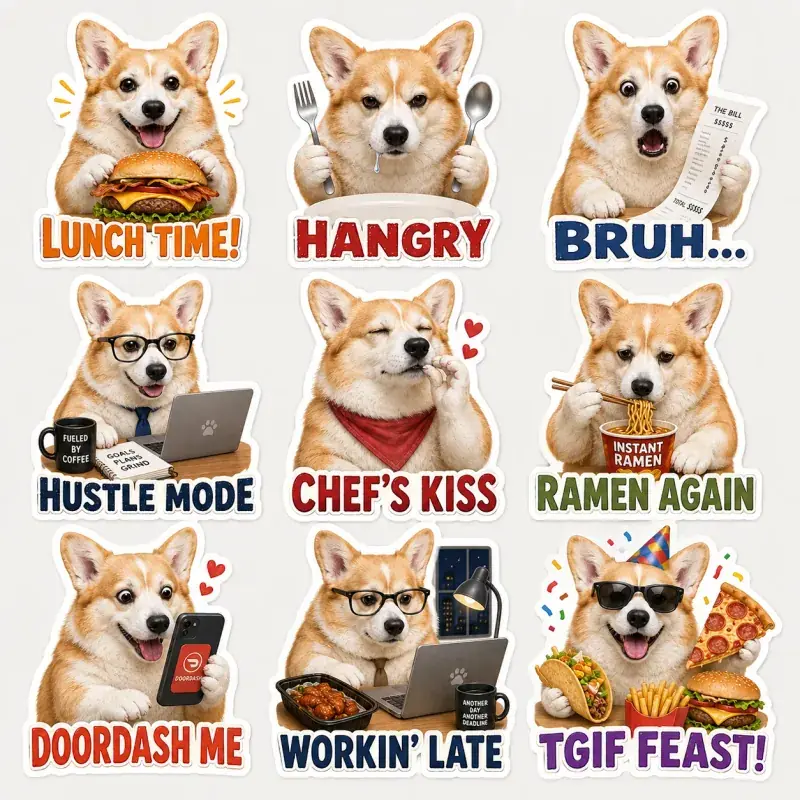
How to make WhatsApp stickers from a pet photo
Create the stickers on Sticker3x3 first, then import the files inside WhatsApp. A normal website cannot install a complete sticker pack into WhatsApp in one tap.
Upload a clear pet photo
Dogs, cats and other pets work when the face is visible and sharp.
Choose a theme and caption language
Pick the mood and language for your nine captions.
Generate the nine stickers
Preview the pack, then download the finished transparent sticker files.
Download the finished files
Save the images, then add them inside WhatsApp to build your pack.
How to add the stickers to WhatsApp
After you download your sticker images:
- Open WhatsApp Stickers and create a new sticker.
- Import each image one by one.
- Add them into a sticker pack and name it.
- Share the pack with friends from the pack menu.
For screenshots and details, follow the full guide: How to add Sticker3x3 stickers to WhatsApp.
What you receive
You download transparent sticker images sized for messaging apps. WhatsApp export uses transparent WebP stickers; follow the in-app steps to build and share your pack.
Photo tips for WhatsApp pet stickers
- Use one clear, well-lit face photo
- Avoid blurry or heavily filtered shots
- Keep distinctive markings visible
- Crop tightly if multiple pets appear in the frame
Supported messaging apps
This page focuses on WhatsApp. For the full import walkthrough, open the How to add Sticker3x3 stickers to WhatsApp guide. You can also make packs for LINE and Telegram with the same downloads.
FAQ
Can Sticker3x3 install a sticker pack directly into WhatsApp?
No. A normal website cannot install a sticker pack into WhatsApp in one tap. Download the images, then add them inside WhatsApp (or use a supported companion app).
How many stickers does one pack contain?
Each Sticker3x3 pack contains nine stickers in a 3×3 set.
Can I use dog and cat photos?
Yes. Clear photos of dogs, cats and other pets all work with the same flow.
Do the stickers have transparent backgrounds?
Yes. Sticker3x3 removes backgrounds and delivers transparent sticker files for messaging apps.
Can I share my WhatsApp sticker pack with friends?
Yes. After you build the pack in WhatsApp, you can share it from the pack menu. See the WhatsApp guide for details.
Related sticker makers
Ready to make WhatsApp pet stickers?
Create nine custom stickers from one photo, then add them in WhatsApp.
Create my stickers